
Wrote: Fatbardh Dema
Users of the messaging app WhatsApp have started receiving a notification containing a 6-digit code.
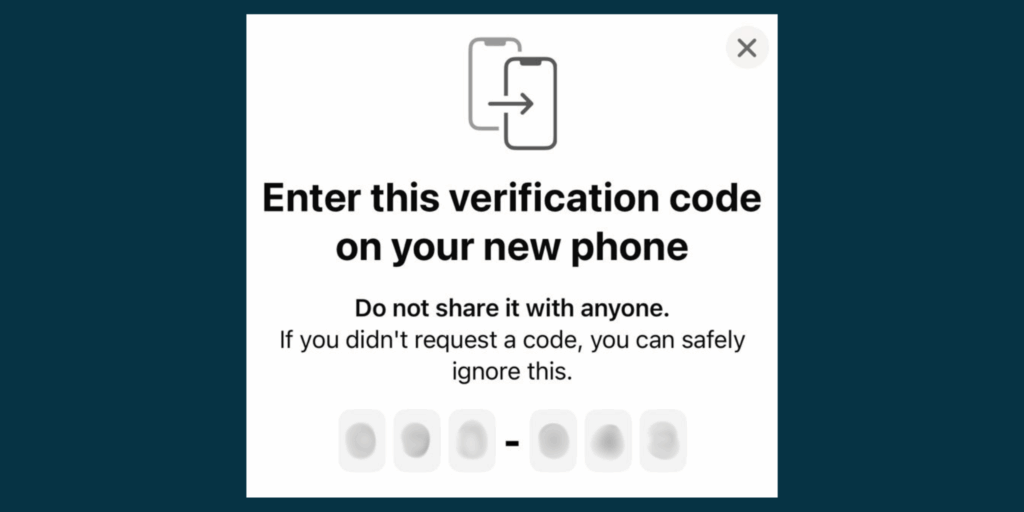
The notification appears the moment users open the app. It says "Enter this verification code on your new phone / Do not share it with anyone. If you didn't request a code, you can safely ignore this. (Albanian: Enter this verification code on your new phone / Do not share it with anyone. If you did not request a code, you can safely ignore this.
Readers of hibrid.info have sent this WhatsApp notification to our email, explaining that the code is coming to them without their request and that they have not changed their device (phone).

What are these codes?
Receiving a one-time password (OTP) code that you didn't request via text message or email could be a sign that someone is trying to break into one of your online accounts to gain access to your private information.
OTP is a numeric code that is used as an additional form of verification to authenticate users before they can access their accounts. This code can only be used once. Receiving an OTP code that you did not request could mean that someone else is trying to access your accounts, so it is important to act quickly. (see here)
What does WhatsApp say about codes that come without asking for them?
When you receive this notification without requesting a verification code, it means that someone has entered your phone number and requested a registration code. This often happens if another user has mistyped your number when trying to enter their own number to register, and it can also happen when someone is trying to take control of your account. (see here)
Two-step verification (two-step verification) is an optional feature that adds more security to your WhatsApp account.
Shih here how to secure your account through two-step verification
WhatsApp explains that there is not enough information to identify the individual trying to verify your WhatsApp account, adding that if someone logs into your account from another device they cannot read your past conversations.
Hibrid.info, during its online research, found an article published on the platform "Caymancompass.com", which had addressed the same notification that appears on the WhatsApp application. (see here)
The head of the Royal Cayman Islands Police Service's Cyber Crime Team, John Watson, had explained that within a year, 24 Cayman Islanders had fallen victim to this WhatsApp scam, and that some of these victims had lost money to the scammers.
“So, I can use a phone and try to create a WhatsApp account using a person’s phone number, for example. I’ll get to the point where I have to authenticate. There, the verification code will go to that person’s phone. What I have to do now, as the perpetrator or the scammer, is… convince you to give me that six-digit code. Once I have that six-digit code, I basically control your account and can lock you out of it,” he explained.
What to do if someone has accessed your WhatsApp account?
Kliko Log back in > Continue (Log in again > Continue).
If prompted, enter your full international phone number and click Next > Ok (Next > OK).
Enter the 6-digit code you receive via SMS or phone call.
When you re-register your account with the 6-digit code, all devices linked to your WhatsApp account will be automatically disconnected.
You may be asked to enter a PIN for two-step verification. If you don't know your PIN, in rare cases someone else using your account may have enabled two-step verification. If you don't have your PIN, wait 7 days and try again. Whether you know your PIN or not, anyone using your account is automatically logged out after entering the 6-digit SMS code.
If you suspect that someone else is using your WhatsApp account, you should let your family and friends know, as this person could be impersonating you in chats and groups. To help protect your account, WhatsApp will notify you when someone tries to register an account with your phone number. (see here)